Showing posts with label Android. Show all posts

Saturday, December 7, 2013

Google Puts Money on Robots, Using the Man Behind Android

If Amazon can imagine delivering books by drones, is it too much to think that Google might be planning to one day have one of the robots hop off an automated Google Car and race to your doorstep to deliver a package?

Google executives acknowledge that robotic vision is a “moonshot.” But it appears to be more realistic than Amazon’s proposed drone delivery service, which Jeff Bezos, Amazon’s chief executive, revealed in a television interview the evening before one of the biggest online shopping days of the year.

Over the last half-year, Google has quietly acquired seven technology companies in an effort to create a new generation of robots. And the engineer heading the effort is Andy Rubin, the man who built Google’s Android software into the world’s dominant force in smartphones.

The company is tight-lipped about its specific plans, but the scale of the investment, which has not been previously disclosed, indicates that this is no cute science project.

At least for now, Google’s robotics effort is not something aimed at consumers. Instead, the company’s expected targets are in manufacturing — like electronics assembly, which is now largely manual — and competing with companies like Amazon in retailing, according to several people with specific knowledge of the project.

A realistic case, according to several specialists, would be automating portions of an existing supply chain that stretches from a factory floor to the companies that ship and deliver goods to a consumer’s doorstep.

“The opportunity is massive,” said Andrew McAfee, a principal research scientist at the M.I.T. Center for Digital Business. “There are still people who walk around in factories and pick things up in distribution centers and work in the back rooms of grocery stores.”

Google has recently started experimenting with package delivery in urban areas with its Google Shopping service, and it could try to automate portions of that system. The shopping service, available in a few locations like San Francisco, is already making home deliveries for companies like Target, Walgreens and American Eagle Outfitters.

Perhaps someday, there will be automated delivery to the doorstep, which for now is dependent on humans.

“Like any moonshot, you have to think of time as a factor,” Mr. Rubin said. “We need enough runway and a 10-year vision.”

Mr. Rubin, the 50-year-old Google executive in charge of the new effort, began his engineering career in robotics and has long had a well-known passion for building intelligent machines. Before joining Apple Computer, where he initially worked as a manufacturing engineer in the 1990s, he worked for the German manufacturing company Carl Zeiss as a robotics engineer.

“I have a history of making my hobbies into a career,” Mr. Rubin said in a telephone interview. “This is the world’s greatest job. Being an engineer and a tinkerer, you start thinking about what you would want to build for yourself.”

He used the example of a windshield wiper that has enough “intelligence” to operate when it rains, without human intervention, as a model for the kind of systems he is trying to create. That is consistent with a vision put forward by the Google co-founder Larry Page, who has argued that technology should be deployed wherever possible to free humans from drudgery and repetitive tasks.

The veteran of a number of previous Silicon Valley start-up efforts and twice a chief executive, Mr. Rubin said he had pondered the possibility of a commercial effort in robotics for more than a decade. He has only recently come to think that a range of technologies have matured to the point where new kinds of automated systems can be commercialized.

Earlier this year, Mr. Rubin stepped down as head of the company’s Android smartphone division. Since then he has convinced Google’s founders, Sergey Brin and Mr. Page, that the time is now right for such a venture, and they have opened Google’s checkbook to back him. He declined to say how much the company would spend.

This article has been revised to reflect the following correction:

Correction: December 5, 2013

An article on Wednesday about Google’s increasing investment in robotics, including the acquisition of technology companies related to the field, misspelled the name of one such acquisition, a small design firm that makes high-tech wheels. It is Holomni, not Holonomi.

Sunday, December 1, 2013

Q&A: Printing From an Android Tablet

Android Tablet

To the Printer

Q. Is it possible to print from my Nexus tablet to my home printer?

A. Third-party printing apps in the Google Play store offer a few ways to print from an Android tablet, but Google has its own solution as well: Google Cloud Print. It connects a home printer to the web, where web-connected devices like Android tablets and smartphones can see and use it.

Although the technology works a bit more smoothly with printer models classified as “Cloud Ready,” you can also use an older printer — as long as that printer is connected to your computer. You need a free Google account and the company’s Chrome browser installed on the computer that is connected to the printer. You also need Google’s Cloud Print app from the Play store on your tablet or smartphone to manage print jobs and printer options.

A bit of setup is involved before you can start printing, including registering the printer with the Google Cloud Print service using the Chrome browser. You can find instructions, answers to common questions, a list of Cloud Ready printer models and troubleshooting guides at support.google.com/cloudprint.

If you have updated your device to Android 4.4 (KitKat), a built-in printing function is included; the Talk Android site has a how-to video.

Making Web Pages

Easier to See

Q. How can I make web pages appear bigger in Internet Explorer 10 for Windows 7 — without pressing the Control and Plus (+) keys each time?

A. Click on the Tools icon on the far right side of the screen (or press the Alt and the X keys) to open the menu. On the Tools menu is a Zoom option. From the Zoom submenu, you can select a preset size (up to 400 percent) or create a custom size for viewing the pages. When you select a new size, you should see the contents of page immediately get larger. The View menu in Internet Explorer also has the Zoom controls and an option for increasing the text size.

Some sites may set their own type sizes. You can usually override this by returning to the Tools menu icon and selecting Internet Options from the menu. Click the General tab in the Internet Options box and then click the Accessibility button in the lower-right corner. Turn on the check box next to “Ignore font sizes specified on webpages” and click O.K.

TIP OF THE WEEK Facebook’s privacy settings have changed frequently over the years and it may be hard to discern what your profile looks like to friends or to members of the public who are browsing Facebook. If you want to observe what others can see on your Facebook profile, log into your account and click your name in the blue bar at the top of the page.

When you land on your Timeline page, click the settings arrow next to the Activity Log button and choose “View As...” from the menu. Facebook then displays what a nonfriend would see on your page. You can also use the “View as Specific Person” option at the top of the page to check out what any of your friends can see.

Click the “x” at the top of the preview page to go back to your regular Facebook view. If you saw things you would rather keep private from the public or certain groups of friends, click the gear-shaped settings icon in the top-right corner of your page and select Privacy Settings to make the adjustments.

Google Plus has similar controls for displaying different amounts of information on your public profile. To make changes, log into your Google Plus account, click on the Home menu and select Settings and then click on “Profile and privacy.” J. D. BIERSDORFER

Personal Tech invites questions about computer-based technology to QandA@nytimes.com. This column will answer questions of general interest, but letters cannot be answered individually.

Friday, November 1, 2013

Bits Blog: Updating Android, Google Announces New Nexus Phone

Sunday, October 27, 2013

Q&A: Editing Microsoft Word Files on an Android Tablet

Q. I don’t have a subscription to the Office 365 site, so what’s the easiest way to read and edit Microsoft Word documents on an Android tablet?

A. The Google Play store has several apps for working with Microsoft Word files. When shopping for an app, check the feature list carefully, as some free programs allow you only to view files on your Android device, not edit them.

Apps that offer document editing include the $15 full versions of Documents To Go or OfficeSuite Pro 7, the free Kingsoft Office or the free Olive Office Premium. Features and user reviews vary by app, so study up before downloading to make sure you get everything you want.

Quickoffice, another popular app for working with Word files, was recently withdrawn from the Google Play store, but for a reason. Last year, Google bought the company behind the software, and last month it made Quickoffice free for Android and iOS users. The new Quickoffice app requires a free Google account and stores files online with Google Drive. The new version does not support online syncing and storage to other services like Dropbox, as previous versions did.

Using Folders in the Safari Bookmarks Bar

Q. How do I make a drop-down menu of related bookmarks on my Safari toolbar in Mac OS X 10.8?

A. Safari, Apple’s browser for the Mac, can store folders of favorites (as well as links to single sites) in the “bookmarks bar” below the address/search box. When you have a folder in the bookmarks bar, clicking a folder name reveals a vertical menu with all the bookmarks stored in that folder.

If you have bookmarked sites in Safari that you want to add to the bookmarks bar, start by making a folder. Right-click (or hold down the Mac’s Control key and click) in an empty spot on Safari’s bookmarks bar area and choose New Folder. You can enter a name for the new folder right there.

Next, right-click or Control-click the new folder and choose Edit Contents. This opens the Bookmarks window in Safari, with the Bookmarks Bar icon selected and a list of the program’s bookmarks underneath it in the left pane of the window. From here, you can drag the bookmarks you want to add from the left pane into your new folder in the center of the screen. (If you turn on the Auto-Click checkbox in the Bookmarks window, all the bookmarks stored in that folder will open in separate browser tabs when you click the folder’s name in the Safari window.)

As an alternative method, you can also create a new folder and open up the Bookmarks window all at once — just go to the Bookmarks menu in Safari and choose Add Bookmark Folder. When the Bookmarks window opens, name your untitled folder in the left pane, drag in the desired bookmarks and then drag the new folder onto the Bookmarks Bar icon at the top of the column.

Once you close the Bookmarks window (click the small book icon in the Safari toolbar, or go to the Bookmarks menu and choose Hide All Bookmarks), your new folder should be waiting for you in the bookmarks bar. Click it and select the site you want to visit from the menu.

Thursday, July 11, 2013

Pogue’s Posts Blog: A Better Google Maps App for Apple and Android Devices

Google Map's new directory buttons. Google Map’s new directory buttons.

Our story so far: Last September, Apple decided to dump the Google Maps app that had been on the iPhone for years. Apple replaced it with its own Maps app — software with so many problems that Apple’s chief executive, Tim Cook, apologized and even recommended that people use other apps until Apple could fix its own one.

In December — incredibly quickly — Google responded by introducing its own Maps app for iPhone. It’s a spectacular app, among the best apps ever written. It’s fast, beautiful and so good at guessing what you mean when you start typing a destination, it’s almost mind reading. You can read the details here.

Today, that delightful news gets even better. Not only has Google improved Google Maps for iPhone, it’s also brought that same free app to three machines that never had it: the iPad, Android phones and Android tablets. (The Android versions are available for download today; it requires the Ice Cream Sandwich or Jelly Bean version of Android — recent versions, in other words. The iOS versions will be available shortly.)

For Androidians, the biggest news is the design of the app itself. It’s modeled on the iPhone app, the one that’s simple and fast and elegant. It’s also uncluttered by the morass of menus that have always plagued the existing Maps app for Android.

But for practitioners of all religions — tablet, phone, iOS, Android — the other news is the new features that today’s new version brings. They include:

* Greater speed. All app versions are faster than before.

* Better place information. Half the time, you don’t even need navigation instructions; you just use Google Maps as the world’s smartest Yellow Pages, to find a nearby restaurant, movie theater, drugstore or whatever.

The details for found places now include a one-line description (“Chinese restaurant famous for dim sum”); a five-star rating system (including a decimal — “4.3,” for example — because, let’s face it, almost everything these days winds up with a four-star rating); the ability to upload your own photos of a place; and a more complete integration of the Zagat guides, which Google bought.

* Greater emphasis on exploration. Google Maps has always excelled at getting you to a known destination. But Google now wants the app to help you choose a restaurant, bar, store, recreation center or hotel, at least in major United States and European cities.

If you tap in the Search box without typing anything, new, photographic buttons appear: Eat, Drink, Shop, Play, Sleep. Each opens lists of corresponding facilities, sorted by criteria like Local Favorites, Popular with Tourists and so on. (Google says that these recommendations are never paid placement.)

* Traffic incidents and auto-rerouting. At last: Google Maps shows more than colored lines indicating current traffic speeds on major roads. Now it also displays tiny icons that represent accidents and construction. Tap one to read the details: “Right lane blocked on 680,” for example. (In case you were wondering, the information on traffic incidents doesn’t come from Waze, the traffic-incident app that Google recently bought. That data has yet to be incorporated into Maps.)

Better yet: Maps now looks ahead for traffic jams on your route, and interrupts your drive with a dialog box that offers to route you around it (if the new path would be quicker, of course). On its own.

* Offline maps. This feature is something of an Easter egg. It’s undocumented, a feature inserted by Google engineers simply because they wanted it. You can access it only if you know the secret. But wow, is it worth it.

This feature memorizes the map data for whatever area is displayed on your screen right now (up to a whole city in size). That way, you can use Google Maps even when you’re overseas and don’t want to turn on data roaming (because that’s insanely expensive), or when you’re in an area where there’s no cell reception. It’s very handy.

To capture a map snapshot like this, tap in the Search box. Use the speech-recognition button and say, “OK Maps.” (It’s a riff on the command “OK Glass” that prepares Google Glass, the company’s “smart headband,” for voice commands.)

A message quietly lets you know you’ve successfully stored the displayed area.

*Nice tablet layouts. On a tablet, Maps really shines. The app smartly reformats itself to take best advantage of whatever screen shape you have: two or three columns of place listings, for example, and luxuriously displayed photos and reviews for each business.

This new, improved Maps app works identically on both major flavors of phone and tablet. You know what? I don’t care how much you distrust Google and its motives. This is crazy good software, some the best work Google has ever done.

Tuesday, April 9, 2013

Europe Receives Complaint About Google’s Android

The complaint was filed by Fairsearch Europe, a group of Google’s competitors, including the mobile phone maker Nokia and the software titan Microsoft, and by other companies, like Oracle. It accuses Google of using the Android software “as a deceptive way to build advantages for key Google apps in 70 percent of the smartphones shipped today,” said Thomas Vinje, the lead lawyer for Fairsearch Europe, referring to Android’s share of the smartphone market.

For example, phone makers that agree to use Android — and that also want Google applications like YouTube — face contractual requirements to place those applications and other Google-branded applications in prominent positions on the mobile device’s desktop, Mr. Vinje said.

In an interview on Monday, the European Union’s antitrust chief, JoaquĆ­n Almunia, declined to comment on the new complaint but said officials had been examining the Android operating system independently of the two-year inquiry into whether Google had abused its dominance of Internet search.

When a formal complaint like this is made, the commission must at some point decide whether to take up the case or drop it.

Mr. Almunia also said that he was receiving proposals this week from Google to clear up concerns about its search practices, and that he hoped they would make it easier for Internet users to identify when Google was promoting its own services rather than those of competitors who might offer better results.

“This is a new step in the investigation,” he said.

A Google spokesman, Al Verney, would not specifically discuss either the new complaint or the comments by Mr. Almunia about the search case, saying only that the company continued “to work cooperatively” with the commission.

The European Commission opened its antitrust inquiry into Google’s search practices in November 2010. The investigation has since focused on whether Google might have unfairly taken advantage of its market dominance by giving preference to links to its own services, like Google Maps, when answering queries; whether Google disadvantaged competitors by including material in search results that came from other Web sites; and whether Google conducts its advertising business in accord with European antitrust law.

Last May the commission suggested that Google propose changes in how search results are presented as a way to settle the case. Since then, regulators and Google have been negotiating over those changes and other terms.

In Monday’s interview, Mr. Almunia said Google needed to offer the commission a solution where choices between Google-branded search results and those of its competitors were clearly visible within the search engine both on desktop computers and on mobile devices.

“I don’t know if you should call it labeling, or whatever, but they need to distinguish,” Mr. Almunia said.

“In some cases this can be achieved through the information you will receive through the natural search results,” he said. “In other cases, maybe we will ask Google to signal what are the relevant options, alternative options, in the way they present the results.”

The choice “should be a real one,” he said.

Mr. Almunia said regulators were not requiring Google to make changes to its algorithm, the secret formula that the company uses to determine the best responses to search queries.

In terms of the way Google uses and displays snippets of information from other Web sites in its search results, he said he expected Google to accept that other companies could choose “to allow or not to allow Google to use the content, but this decision cannot have as a consequence the punishment of those who will not allow the use of the content in terms of search results.”

Web sites and some publications have complained in recent years of virtually disappearing from Google’s search engine if they posed a competitive threat or did not comply with Google’s terms.

Mr. Almunia said he would test any changes that Google proposed to make by sending questionnaires to competitors, including the complainants, and to other companies.

Mr. Almunia said in Europe, where Google is especially strong, with more than 90 percent of the search market, compared with about 70 percent in the United States, it is particularly difficult for search engines to establish themselves if they focus on narrow but deep services like online shopping, travel or mapping.

But Mr. Almunia also said his approach in the case was not aimed at “protecting competitors,” as critics of European regulation have long complained.

Mr. Almunia said that he had concerns that Google had abused its dominance to promote its own products but that he would not need to “find a final answer to this question” if Google reached a settlement. “We are concerned by the possibility of an abuse,” he said.

“What is clear in our view is the market dominance of Google,” Mr. Almunia said. “This is obvious.”

He also noted that “it would not be surprising” if Google faced formal charges in a case concerning Motorola Mobility, a mobile phone maker owned by Google. That case follows complaints by Microsoft and Apple that they were victims of unfair licensing conditions and abusive litigation by Motorola Mobility.

The commission has taken a tougher line with Google than has the Federal Trade Commission on the issue of how Google runs its search rankings. The F.T.C. decided in January, after a 19-month inquiry into how the company operated its search engine, that Google had not broken antitrust laws.

Monday, April 8, 2013

Bits Blog: Facebook Seeks to Be Mobile ‘Home’ of Android Users

Mark Zuckerberg introduced the Facebook Home app at the company’s Menlo Park, Calif., headquarters.Jim Wilson/The New York Times Mark Zuckerberg introduced the Facebook Home app at the company’s Menlo Park, Calif., headquarters.

9:20 p.m. | Updated Added more details and analysis.

MENLO PARK, Calif. — Cellphones have long been Facebook’s Achilles’ heel. With its users flocking to mobile phones by the millions — and many of its newest users never accessing the services on computers at all — the company has struggled to catch up to them.

On Thursday, Facebook unveiled its latest, most ambitious effort to crack the challenge: a package of mobile software called Facebook Home that is designed to draw more users and nudge them to be more active on the social network.

The new suite of applications effectively turns the Facebook news feed into the screen saver of a smartphone, updating it constantly and seamlessly with Facebook posts and messages.

In so doing, Facebook has cleverly, perhaps also dangerously, exploited technology owned by one of its leading rivals, Google. Facebook Home works on Google’s Android operating system, which has become the most popular underlying software for smartphones in the world.

The Facebook News Feed appears as soon as the phone is turned on. Pictures take up most of the real estate, with each news feed entry scrolling by like a slide show. Messages and notifications pop up on the home page. To “like” something requires no more than two taps. Facebook apps are within easy reach, making the phone essentially synonymous with the Facebook ecosystem.

“Today, our phones are designed around apps, not people,” said Mark Zuckerberg, Facebook’s chief executive, at a news conference here at the company’s headquarters. “We want to flip that around.”

Facebook Home will be available for download from Google’s app store, Play, on April 12 for four popular, moderately priced phones that use Android and are made by HTC and Samsung. A fifth one, a new model called the HTC First, will be sold by AT&T for $100 with the software already loaded.

For the time being, Facebook will not show ads on the phone’s home screen, which Facebook is calling Cover Feed. Since advertising revenue is crucial to the company’s finances, however, it will almost certainly display ads there in the future.

Facebook Home is also clearly designed to get Facebook users to return to their news feeds even more frequently than they do now. Every time they glance at their phone at the supermarket checkout line or on the bus to work, they will, in essence, be looking at their Facebook page.

“It’s going to convert idle moments to Facebook moments,” said Chris Silva, a mobile industry analyst with the Altimeter Group. “I’m ‘liking’ things, I’m messaging people, and when ads roll out, I’m interacting with them and letting Facebook monetize me as a user.”

Krishna Subramanian, the chief marketing officer at Velti, a San Francisco-based company that buys targeted advertisements online on behalf of brands, pointed out that even without showing ads on the mobile cover feed, Facebook Home could prove to be a lucrative tool.

By nudging its users to do more on the social network, he said, the company will inevitably get “an explosion of mobile data that can be tied back into desktop advertising” to Facebook users.

A majority of Facebook’s one billion-plus users log in on their cellphones. Most Americans now have an Internet-enabled phone, and smartphone penetration is growing especially fast in emerging market countries, where Facebook has substantial blocs of its users.

At Thursday’s press event, Mr. Zuckerberg repeatedly signaled that he wanted the new product to enable a mass, global audience to connect to Facebook, especially those have yet to get on the Internet. “We want to build something that’s accessible to everyone,” he said.

Although HTC is rolling out the first new phone with Facebook Home installed, and AT&T has agreed to sell it, other phone makers and carriers may be reluctant to load the software.

Jan Dawson, a telecom analyst at Ovum, said that Apple’s iPhone and many Android smartphones already do a good job of integrating the Facebook application into their phones. And he said phone carriers were unlikely to give a Facebook phone made by HTC much support because the Taiwanese phone maker’s past attempt at a Facebook phone — the ChaCha, which had a physical button for posting photos on Facebook — sold poorly.

“HTC may be desperate enough to do this, but carriers aren’t likely to promote it heavily,” Mr. Dawson said. “As a gimmick, it may bring customers into stores, but they’ll mostly end up buying something else.”

At Facebook headquarters Thursday, HTC’s chief executive, Peter Chou, showed off a model of his new Facebook phone, called HTC First, in lipstick red. “HTC First is the ultimate social phone,” he said. “It combines the new Facebook Home and great HTC design.”

Whether consumers will embrace a phone that emphasizes Facebook over everything else also remains to be seen. Some are likely to have concerns about how much personal information they are being asked to share with Facebook. Additionally, checking Facebook dozens of times every day could result in hefty data use charges, unless users are connected to a Wi-Fi network or negotiate special packages with carriers.

Facebook and AT&T executives said they had taken that into account. Users will be notified when they are about to reach their data limits. The software can also be set to download data-heavy content like video only when the user is connected to a Wi-Fi network, and then save it in its memory.

The software’s most powerful feature is to turn the cellphone into a starkly personal gadget.

Facebook employees, current and past, were invited to the product announcement, a sign of how crucial it has been for Facebook to crack the mobile puzzle. Silicon Valley has whispered for months about the prospects of a Facebook phone. Mr. Zuckerberg has consistently denied building one.

Thursday’s announcement signaled that Facebook had stopped short of even building an operating system. Instead, it had simply altered its rival Google’s technology.

The Android platform, Mr. Zuckerberg said, was built to be open to new integrations. Asked at the news conference whether he feared that Google executives would change their mind about Facebook using it to advance its mobile aims, he turned somewhat testy.

“Anything can change in the future,” he said. “We think Google takes its commitment to openness very seriously.”

Google, for its part, was notably genteel. “This latest collaboration demonstrates the openness and flexibility that has made Android so popular,” the company said in an e-mailed statement. “And it’s a win for users who want a customized Facebook experience from Google Play — the heart of the Android ecosystem — along with their favorite Google services like Gmail, Search and Google Maps.”

Brian X. Chen contributed reporting.

Sunday, March 17, 2013

Bits Blog: Google Puts Android and Chrome Under One Boss

Sundar Pichai's appointment could have broad implications for the mobile business.Stephen Lam/Reuters Sundar Pichai’s appointment could have broad implications for the mobile business.

3:30 p.m. | Updated Added comments from Andy Rubin in letter to Android developers.

Google announced on Wednesday a change in its executive ranks that could have broad implications for the mobile business.

Andy Rubin, who had been senior vice president in charge of Android, Google’s mobile operating system, has been replaced by Sundar Pichai. Mr. Pichai is the senior vice president of Chrome, and will now oversee Android as well.

Google has been in a confusing position because it has two unrelated operating systems: Chrome and Android.

At first, Google said they were separate: Chrome was for computers and the Web, and Android was for touch-screen mobile devices and apps.

But the lines among devices have blurred. Now, some computers (like the Chromebook Pixel that Google introduced last month) have touch screens, and people use mobile devices the way they used to use computers.

The personnel change is a sign that Google now sees the need to somehow coordinate or merge the two operating systems.

Though Android has been wildly successful, with 750 million devices activated worldwide, computers running Chrome’s operating system have not.

At a press event to introduce the new Chromebook, Mr. Pichai drew less of a distinction between the two operating systems than Google executives had in the past.

“So far, we have been in a world which has been pretty straightforward: Android phones and tablets and Chrome laptops,” Mr. Pichai said. “But lines do blur.”

“The way we think about it internally,” he said, “is as a user, you sign in to both these devices, you use search, Maps, Gmail” and other Google products. “All your Google services work seamlessly across devices.”

The company did not provide any details about how Chrome or Android might change under the new leadership.

“Today we’re living in a new computing environment,” Larry Page, Google’s chief executive, wrote in a company blog post announcing the change. “People are really excited about technology and spending a lot of money on devices.”

Mr. Pichai has had a fast rise at Google and has experience developing hardware, a new area of focus for the company. In addition to Chrome and Android, he also oversees Google Apps, like Gmail and Drive, for consumers and businesses.

Mr. Rubin is a big name in the mobile world. He is a co-founder of Android, which Google bought in 2005 and turned into Apple’s biggest mobile competitor and the most-used mobile operating system.

Google did not say why Mr. Rubin was replaced. Despite Android’s success, it is at a crossroads as device-making partners like Samsung and Amazon increasingly become competitors.

Mr. Page praised Mr. Rubin and said he would stay at the company in a new position, though he did not say what it would be. But there were hints that Mr. Rubin could join Google X, the company’s lab for creating new technologies like driverless cars, Google glasses and other wearable technologies. The glasses run Android.

Mr. Page wrote, “Andy, more moonshots please!” Google refers to Google X as a lab for “moonshots,” or world-changing ideas.

Motorola, the Android cellphone maker that Google spent $12.5 billion to buy, could also benefit from Mr. Rubin’s perspective as it tries to make phones that compete with those from Apple and Samsung. While Mr. Rubin was overseeing Android, Google tried to keep a strict wall between the two companies to appease Motorola’s competitors.

In a letter to Android developers on Wednesday, Mr. Rubin praised the Android team and wrote, “Today, the success of Android combined with the strength of our management team, gives me the confidence to step away from Android and hand over the reins.”

“As for me, I am an entrepreneur at heart and now is the right time for me to start a new chapter within Google,” he said in the letter, which was first published by The Wall Street Journal.

Google Selects New Chief for Android Unit

Google appointed Sundar Pichai, the executive overseeing its Chrome web browser and applications like Google Drive and Gmail, to take over Rubin's responsibilities, hinting at how the company with the dominant Internet search engine intends to address the rise of mobile devices.

In a blog post, Larry Page, Google's chief executive and co-founder, credited Rubin for evangelizing Android several years ago and building it into a free, open-source platform that runs on nearly three-quarters of the world's smartphones and is used by the world's largest handset manufacturers, from Samsung Electronics Co Ltd to HTC Corp.

"Having exceeded even the crazy ambitious goals we dreamed of for Android — and with a really strong leadership team in place — Andy's decided it's time to hand over the reins and start a new chapter at Google," Page wrote. "Andy, more moonshots please!

The merger of the Chrome and Android divisions helps resolve a longstanding tension in the Mountain View, California-based company's corporate strategy, and reflects a convergence of mobile and desktop software.

When Google poured resources into launching the Chrome web browser five years ago, the company laid out a vision of the Internet and an ecosystem of Google apps based on the Web. But the Android operating system, acquired by Google in 2005, has also been a runaway success, enabling third-party handset makers like Samsung to overtake Apple Inc while also spawning a massive economy of third-party apps that are only loosely affiliated with Google.

Under Pichai's direction, Google has released several netbook computers using the Chrome operating system. Last month, when Pichai unveiled the Chromebook Pixel, the first Chrome-based laptop with a touch-screen interface, analysts noted that Chrome and Android appeared to be on converging paths.

"You had this Chrome OS and this Android Group that were building in many overlapping products," said Michael Gartenberg, an analyst at Gartner.

Gartenberg argued that despite Android's overwhelming popularity, it is Chrome that remains at the core of Google's strategy.

"For Google, it's not about the platform, but the ecosystem," Gartenberg said. "They're more concerned long-term about Google Docs, Google Voice, Google Books, and less about helping Samsung sell more phones."

Chrome, Gartenberg added, "is the purest expression of Google's philosophy."

FUTURE ROLE

Page was mum on Rubin's future role. Some analysts speculated that Rubin, an executive with a knack for developing products, could take on one of the company's many budding projects such as its Glass eyewear or the self-driving car.

"If he really has the magic touch perhaps he can create something else within Google," said Colin Gillis, an analyst at BGC Partners, who added that it was better for Google to have a more "cohesive" mobile brand.

Still, it remains unclear how Pichai would seek to merge Chrome and Android, if at all. Microsoft Corp, for example, recently introduced its Windows 8 operating system that was designed for both touch-screen desktop devices and Windows smartphones like the Nokia Lumia, while its Surface tablet further blurred the distinctions between form factors.

In his blog post, Page said Pichai would "double down" on Android.

"Sundar has a talent for creating products that are technically excellent yet easy to use — and he loves a big bet," Page wrote. "So while Andy's a really hard act to follow, I know Sundar will do a tremendous job doubling down on Android as we work to push the ecosystem forward."

Android is now installed on roughly two-thirds of the world's smartphones, supplanting Apple Inc at the pinnacle of the fast-moving mobile arena.

Android tablets are also expected to overtake Apple's iPad in terms of shipments in 2013, IT research house IDC predicted on Tuesday.

But Android's explosive growth - and the companies it has boosted - have also concerned Google's leadership. Rubin himself has warned other Google executives that Samsung could use its heft to renegotiate its ad revenue-sharing deals with Google, the Wall Street Journal reported last month.

LEADING VOICE

The re-shuffle reinforces Pichai, a senior vice president, as one of the leading voices within Google.

Trained as an engineer in India before moving to the United States, Pichai holds degrees from Stanford University and the University of Pennsylvania's Wharton School. He joined Google in 2004.

In 2008, Pichai aggressively pushed Google's Chrome browser, when Microsoft Corp's Explorer lorded over the market. Chrome now commands a roughly 35 percent market share according to Web traffic analyzers StatCounter.

He is also credited with the development of some of the company's most successful cloud-based apps, such as Calendar and Gmail, and has also steered Google Drive.

"Today we're living in a new computing environment," Page wrote. "People are really excited about technology and spending a lot of money on devices."

Google shares closed down 0.3 percent at $825.31.

(Reporting by Edwin Chan and Gerry Shih; Additional reporting by Alistair Barr; Editing by Gerald E. McCormick, Leslie Adler, Andrew Hay and Bernard Orr)

Sunday, March 3, 2013

Samsung Armors Android to Take On BlackBerry

Samsung’s smartphones have been best sellers all over the world, but the company has been, until recently, marketing them to consumers, not businesses.

But over the last year, Samsung, the South Korean manufacturer, has been quietly beefing up the Google Android software that runs on its smartphones to give businesses a phone with more security.

It introduced that software, named Knox, as in the fort, at an international cellphone industry trade show here this week. Samsung said its new version of Android protected users from malware.

The company hopes that the new software makes Samsung smartphones attractive to corporate information technology departments that worry about the theft of sensitive corporate data by hackers. I.T. managers have been among BlackBerry’s most loyal customers because of the security BlackBerry built into its phones and the private communications network it maintains.

Samsung said it teamed up with General Dynamics, a military contractor, to ensure its phones met the strict security standards of government agencies. Samsung executives have said Knox will first appear on a new Galaxy smartphone in the second quarter. That phone is likely to be the Galaxy S IV, which is expected to be introduced at an event in New York on March 14.

The company has also been focusing more on businesses in its advertisements. It ran a series of amusing commercials during the Academy Awards show on Sunday featuring the phones’ handiness in a business.Samsung said it had evidence that it was ready for enterprise. Thousands of its Galaxy smartphones and tablets are already in the hands of American Airlines flight attendants, Dish Network cable technicians and Boston Scientific health care professionals.

“We will become No. 1 in enterprise,” said Tim Wagner, a vice president for enterprise sales at Samsung who worked at BlackBerry. “If Samsung chooses to be No. 1 in a certain area, we will become No. 1.”

Samsung has become the top seller of televisions and cellphones, but persuading I.T. managers to risk their jobs on a new security system will be tricky. BlackBerry executives insist the BlackBerry is still the top phone for professionals. But the company is vulnerable. Android phones and Apple iPhones last year replaced BlackBerrys as the most-used phones among workers all over the world, according to a study by the research firm IDC.

It found that more businesses were buying iPhones for their employees, and Android phones were the most popular among workers buying their own phones. That puts Samsung, as the leading Android phone maker, in position to become a top vendor for businesses.

To appeal to the business user, Samsung added special features to Android. One tool allows the phone owner to create separate “personas” for personal and business use, a feature also on the new BlackBerry 10.

In a phone’s business persona, an office worker can use apps approved and monitored by the I.T. department. The worker can switch to a personal persona, where personal photos, games and calendar are stored, which cannot be seen by I.T. If the employee were to leave the company and keep the phone, the I.T manager can erase the data from the business persona, leaving the personal data untouched.

The business persona also has a layer of security. If malware were to infect the phone, it would not be able to invade the apps and data in the business persona, said Rhee Injong, a senior vice president for the Samsung group that developed Knox.

Samsung also has teamed up with AirWatch, a company that makes tools for I.T. professionals to manage phones. AirWatch will make detailed tweaks inside the business persona of a Samsung device, like creating restrictions for Wi-Fi networks or blacklisting certain apps.

John Marshall, chief executive of AirWatch, said that the benefit of Samsung’s openness was that businesses could tailor their phone’s software and also better manage the corporate fleet of phones. He said that because BlackBerry made its own I.T. management software, its flexibility was limited. BlackBerry, however, said that its approach offered higher and more consistent levels of security.

Brian X. Chen reported from Barcelona and Ian Austen from Ottawa.

Monday, February 25, 2013

H.P. Slate 7 Tablet Using Android Is Introduced

Hewlett-Packard has introduced the Slate 7, a $169 tablet powered by the Android operating system, a centerpiece of the company’s effort to expand in mobile devices and reduce its dependence on the shrinking personal computer market.

The Slate 7 is H.P.’s latest foray into the consumer tablet market. It follows the failure in 2011 of its WebOS-based TouchPad, which the company stopped selling after just seven weeks, citing poor demand.

Powered by Android 4.1 Jelly Bean, the Slate 7 offers Google services including search functions, YouTube and Gmail, as well as Beats Audio for improved sound, H.P. said. The 13-ounce device includes access to apps and digital content through Google Play, and cameras on both sides of the seven-inch screen.

H.P. said it expected American sales of the Slate 7 to begin in April, and said the product offers a “compelling entry point” for people looking to buy tablets.

Google’s Nexus 7 tablet costs $199, as does Amazon.com’s Kindle Fire HD.

H.P. also makes a business tablet, the ElitePad, which is powered by Microsoft’s Windows 8. WebOS had been developed by Palm, which H.P. bought in 2010.

The Slate 7 is part of a multiyear turnaround plan by Meg Whitman, the H.P. chief.

Sunday, December 23, 2012

State of the Art: Android Cameras From Nikon and Samsung Go Beyond Cellphones - Review

But yes, that’s what it has come to. Ever since cellphone cameras got good enough for everyday snapshots, camera sales have been dropping. For millions of people, the ability to share a fresh photo wirelessly — Facebook, Twitter, e-mail, text message — is so tempting, they’re willing to sacrifice a lot of real-camera goodness.

That’s an awfully big convenience/photo-quality swap. A real camera teems with compelling features that most phones lack: optical zoom, big sensor, image stabilization, removable memory cards, removable batteries and decent ergonomics. (A four-inch, featureless glass slab is not exactly optimally shaped for a hand-held photographic instrument.)

But the camera makers aren’t taking the cellphone invasion lying down. New models from Nikon and Samsung are obvious graduates of the “if you can’t beat ’em, join ’em” school. The Nikon Coolpix S800C ($300) and Samsung’s Galaxy Camera ($500 from AT&T, $550 from Verizon) are fascinating hybrids. They merge elements of the cellphone and the camera into something entirely new and — if these flawed 1.0 versions are any indication — very promising.

From the back, you could mistake both of these cameras for Android phones. The big black multitouch screen is filled with app icons. Yes, app icons. These cameras can run Angry Birds, Flipboard, Instapaper, Pandora, Firefox, GPS navigation programs and so on. You download and run them exactly the same way. (That’s right, a GPS function. “What’s the address, honey? I’ll plug it into my camera.”)

But the real reason you’d want an Android camera is wirelessness. Now you can take a real photo with a real camera — and post it or send it online instantly. You eliminate the whole “get home and transfer it to the computer” step.

And as long as your camera can get online, why stop there? These cameras also do a fine job of handling Web surfing, e-mail, YouTube videos, Facebook feeds and other online tasks. Well, as fine a job as a phone could do, anyway.

You can even make Skype video calls, although you won’t be able to see your conversation partner; the lens has to be pointing toward you.

Both cameras get online using Wi-Fi hot spots. The Samsung model can also get online over the cellular networks, just like a phone, so you can upload almost anywhere.

Of course, there’s a price for that luxury. Verizon charges at least $30 a month if you don’t have a Verizon plan, or $5 if you have a Verizon Share Everything plan. AT&T charges $50 a month or more for the camera alone, or $10 more if you already have a Mobile Share plan.

If you have a choice, Verizon is the way to go. Not only is $5 a month much more realistic than $10 a month, but Verizon’s 4G LTE network is far faster than AT&T’s 4G network. That’s an important consideration, since what you’ll mostly be doing with your 4G cellular camera is uploading big photo files. (Wow. Did I just write “4G cellular camera?”)

These cameras offer a second big attraction, though: freedom of photo software. The Android store overflows with photography apps. Mix and match. Take a shot with one app, crop, degrade and post it with Instagram.

Just beware that most of them are intended for cellphones, so they don’t recognize these actual cameras’ optical zoom controls. Some of the photo-editing apps can’t handle these cameras’ big 16-megapixel files, either. Unfortunately, you won’t really know until you pay the $1.50 or $4 to download these apps.

Sunday, December 16, 2012

Bits Blog: Android Malware Creeps Into Cellphone Bills

Lookout

Smartphones are meant to be headache-free compared with old-school computers. But malicious software written for Android devices can be even sneakier than the malware that invaded PCs.

The most prevalent form of Android malware scrapes small amounts of money from smartphone owners by making secret charges to their phone bills, according to a report published by Lookout, a mobile security company in San Francisco. This type of malware is called toll fraud, and it has the potential to fool plenty of people who don’t pay close attention to their phone bills every month.

But how does toll fraud work if the carriers control our bills? The process is actually very complex, said Derek Halliday, a product manager at Lookout.

First, it helps to understand a legitimate transaction involving text messages. Say, for example, a person wants to send a text message to a service to buy a new ringtone. When this happens, the cellular network forwards the text message to a middleman service, which handles the transaction between the wireless provider and the ringtone provider. The ringtone provider then shoots a message to the cellphone owner asking for confirmation of the order. When the customer confirms the order, he receives the ringtone, his cellphone bill is charged, and the carrier takes a cut and gives the rest of the money to the ringtone provider and the middleman service.

Here’s how toll fraud works: A person downloads a malicious app. The app invisibly sends a text message to a service that uses a middleman service that has a relationship with the malware author. A confirmation message is sent back to the malware, which blocks it from being seen by the customer and confirms the charge. The charge goes to the user’s bill, and the carrier takes its cut and gives the rest of the money to the service and the middleman, and thus the malware author.

In its  report, Lookout estimates that from the beginning of 2012 to the end of 2013, 18 million Android users may encounter malware. About 72 percent of the malware that Lookout detected this year was toll fraud, and the company expects this number to grow, because even though the process is complex, the code isn’t difficult to replicate. The company advised cellphone owners to regularly check their bills for suspicious charges.

Sunday, November 18, 2012

App Smart: News360, Edge Extended, Need for Speed and Other Great Android Apps

If you’re a new owner of one of these, you’ll be happy to know that there’s many an app that will simultaneously thrill you, inform you and welcome you into the world of tablet computing.

For a great news experience, the free app News360 has to be one of the better news-aggregating ones I’ve seen on any platform. When you first open the app, you are presented with a long list of topics that it can aggregate for your convenience into different categories, from arts through science to zombies.

The app uses this profile to grab news from the Web and present it to you within its elegant interface. This is dominated by picture-based “tiles” for each news article the app collects. Each tile tells you the appropriate category, where the news item came from and when. Tapping on one of these tiles takes you to a new page that contains a screen grab of the original online source, alongside the text the app has collected from the article.

The pleasure of News360 is that you can either satisfy your curiosity by tapping on a link to read the original article or decide you have learned enough and navigate on. You can also mark the article as interesting, save it for reading offline — perhaps on a commute — or share it on a social network. These controls are also accessible from the initial “tiles” screen, where you flip over an article’s tile to see the controls. The flip is accompanied by a very pleasing animation. It’s just a little graphical touch, but small details like this make an app great fun.

Part of the fun of having a new tablet is showing off its graphical prowess. Games are a great way to do this. I’ve had immense fun with Edge Extended (about $3 on Google Play). In this game, you play a multicolored cube that you roll around a blocky terrain to collect targets. You swipe your finger on the screen to make the cube flop onto its faces to move. There are all the classic elements of collecting points, avoiding pitfalls, activating switches and so on. But despite its graphical simplicity, the app is swift-paced and very satisfying; it even gave me that sensation of falling from a height in some of its trickier parts.

If you really want to impress people with your tablet’s screen, then you’ll probably get a kick out of a game like Need for Speed Most Wanted ($7 on Google play). It’s a racing game that uses motion to control steering and simple tap controls to brake, slide the car in a drift or turn on a nitrous turbo boost. True to the “Most Wanted” title, you race on regular roads, not racetracks, and can get in trouble with the police. This app has all the typical racing fun, along with the ability to earn points that unlock better cars and so on. But the standout feature is the attractiveness of the graphics, and the image rendering even includes reflections of passing buildings in puddles. It’s really eye-popping, and it even works on a diminutive tablet like the Nexus 7.

If racing’s not your thing, you may like SoulCraft THD instead. In this hack-and-slash role-playing game, you control your character from above as it fights its way through a fantasy landscape of dungeons and cities. As on a standard computer action game, you can earn spells and improve your character’s powers.

The game is “freemium” so it’s free to download and play, but you have to make in-game purchases with real money to advance quickly. The graphics are slick, but don’t expect the kind of detailed rendering you would see on a gaming PC.

If you want to make your pals who own iPads jealous, turn on an animated background. This shows off the computing power of your tablet and Android’s skills, too.

Right now my tablet is rocking the seasonal Autumn Tree Live Wallpaper, which is $1. You can control all sorts of aspects of the app, including what type of trees wave their autumnal leaves in the wind, and it’s delightful. It’s also something that a stock iPad absolutely can’t do.

Have fun, but here’s a big reminder for you: Not all Android tablets will play nicely with all tablet apps, and some features depend on installing the latest edition of the operating system.

Quick Calls

Fresh and free on Android and iOS is a highly unusual “experimental” game, Curiosity. It’s a cube with faces made of millions of smaller cubes. Players all around the world hack away at these by tapping on their devices. A single prize is hidden inside an unknown number of layers. It’s weirdly fun to play ... One of the earliest and slickest apps for Windows 8/RT devices is the official Wikipedia app (free), which shows the online encyclopedia in its most elegant, graphical format yet.

Gadgetwise Blog: App Smart Extra: More Apps for Android Tablets

This week’s App Smart was about apps you may like to try out on your new Android tablet — a class of device that is really making a splash in the mobile computing market to rival the iPad.

But of course there are thousands upon thousands of apps, and only limited space in the column, so here are a few more suggestions.

I suggested the News360 app, and by all means try it out free. But if it does not appeal to you, then you may have more luck with the Flipboard app, also free. This is another highly popular news aggregator that has a graphics-centric interface controlled by gestures. The app is now optimized for the bigger screen real estate that tablets offer compared with Android phones.

If gaming is your thing, then you may be pleased to hear that there is a free, tablet-friendly version of an EA Games classic, The Sims, in the Google Play store. The Sims FreePlay has all the charm of the original game, with tap controls that worked very well on my Nexus 7’s screen. It also has very impressive visuals including detailed character animations, which make the most of the graphical power of an Android tablet.

For live wallpaper, check out Exodus Live Wallpaper, which is free (or $1 for a Pro edition) and will display a rain of cubes gently tumbling and rolling across a tablet’s desktop background. You can adjust many of the parameters and it adds a suitably high-tech flavor to your tablet’s screen. If high tech isn’t your thing, I’ve found Sakura Live Wallpaper to be very eye-catching (free or $1.29 for a Pro version with more controls). Leaves gently tumble from the trees in its Japanese-esque images and they even react to your screen taps.

Of course Android tablets are also great for productivity, and Google’s own stable of apps serve many useful work-related purposes. But if your workplace is resolutely Microsoft-oriented, you may find the free CloudOn app handy. It lets you get to your Excel, Word and PowerPoint documents on your tablet; you can even edit them and share them with colleagues over Dropbox. The app has been freshly updated this month, which means its developers are keeping it current.

Also for productivity, the free Pocket app is highly regarded as a way to store text, images and video from Web sites you like so you can read them later, perhaps at a moment when you have no Internet connection.

Extra Quick Call

Activision’s new free Skylanders Lost Islands app has just hit iOS devices. It’s more like playing The Sims than the role-playing console version of the game, but it does let players of the original import their own personal characters.

Saturday, November 3, 2012

Bits Blog: One on One: Google Android Director on Nexus Strategy

John Lagerling, director of business development for Android. John Lagerling, director of business development for Android.

Google on Monday introduced new Android devices in small, medium and large: a phone, the Nexus 4; an upgraded seven-inch tablet, the Nexus 7; and a 10-inch tablet, the Nexus 10. That puts Google in even more direct competition with Apple, which offers a similar family of three: the iPhone, the iPad Mini and the iPad.

In an interview, John Lagerling, director of business development for Android, talked about the company’s strategy with the Nexus brand, one that revolves around lower prices. An edited transcript of the interview follows.

What do you think are the highlights of the new Nexus devices?

My personal favorites are the 360-degree panoramic photo, Photo Sphere, and the fact that you can do inductive charging so you don’t need to fiddle with a plug — you can just put it on a surface to charge. On a Nexus 10 it’s the fact that it’s so thin and light, and the resolution is 2.5 K, so it has very crisp text and pictures.

And the price. I negotiated the prices and I’m very pleased with being able to deliver these things at these prices; $299 for an unlocked Nexus 4 — I think that’s pretty revolutionary.

How did you get the prices lower?

Basically we felt that we wanted to prove you don’t have to charge $600 to deliver a phone that has the latest-generation technologies. Simply that level of margin is sometimes even unreasonable, and we believed that we could do this. For Nexus 7, we were able to ramp those new memory SKUs at the same price. These move so fast that we knew after a few months, from an economical perspective, it was doable. Between us and our partners we have a very good understanding of supply chains. We’ve all done the best we can to really reach these prices — $399, $299 is pretty amazing, if I may say so.

I noticed each Nexus device is made by a different manufacturer. Is this to keep the playing field fair for Android partners?

It’s not so much fairness as it is to sort of work with partners who happen to be in good “phase match” with us in what we’re trying to do. So Samsung just happens to be in a good phase match on a high-end display, which is exactly what we wanted to do at a low cost. LG had a good phase match with the hardware they were working on. Asus as well. It’s just more about the timing being right.

From top: the Nexus 4, Nexus 7 and Nexus 10. From top: the Nexus 4, Nexus 7 and Nexus 10.
We’ve always done that with our lead devices. Even before the Nexus One we did the lead device with HTC. We did the Xoom, which was a lead device with Motorola. And now we’ve sort of streamlined what the Nexus program is. We did really well with the Nexus 7, I feel, because nobody really pushed the envelope with seven-inch in terms of price and performance. It really proved that category. We felt the 10-inch category was overpriced and underpowered, and we wanted to see what we could do for that from our perspective.

Where does Motorola stand in all this? You haven’t used them yet for the Nexus program.

They stand where Sharp would stand, or Sony would stand or Huawei would stand. From my perspective as a partnership director, they are another partner. We are really walled between the Motorola team and the Android team. They would bid on doing a Nexus device just like any other company.

So how does Google take advantage of the Motorola acquisition?

The way I understand it is, it’s mostly about the patents, the way you can sort of disarm this huge attack against Android. We talked about prices. There are players in the industry who were unhappy about more competitive pricing for the consumers. They want to keep the prices high, they want to force the price to be so high that operators have to subsidize the devices very highly. That’s not only the Cupertino guys but also for the guys up in Seattle. They want higher margins, they want to charge more for software.

We simply believe there’s a better way of doing it without extracting that much payment from end users, because there are other ways to drive revenues. Patents were used as a weapon to try to stop that evolution and scare people away from lower-cost alternatives. And I think with the Motorola acquisition we’ve shown we’re able to put skin in the game and push back.

With Nexus phones, the lack of carrier support is the big roadblock. Only having the marketing and retail support of one carrier — T-Mobile, in the case of the Nexus 4 — isn’t as good as having the Big Four. In the past you’ve sold Nexus phones through the Google online store, and it was a failure.

Nexus One was very early. People didn’t know what Nexus was or what Android phones were. I feel we’re in a very different environment now and I feel the Nexus 7 has set the stage for the Nexus program at a new level, so we feel the time is right.

Approaching one million sales a month for the Nexus 7, right? According to Asus.

We haven’t announced numbers. We typically don’t allow our partners to announce numbers. All I can say is it has sold way above expectations. That could mean one of two things: Either we have very low expectations or we’ve done amazing well. But we’re very pleased with how we’ve done with the Nexus 7.

Most of the apps in the Google Play store are for phones, not for tablets. How many are there for tablets?

I don’t have a number for how many apps are properly adding those APIs that you need to put fully to use the extra screen real estate. What I can say is that the Nexus 7 has been a superstrong catalyst to kick off developers’ attention to making those expansions, so we’ve seen tremendous growth in apps for the larger screen size. The trending is very positive because of the Nexus 7.

But before, I’ll be honest and say, yes, there was a lack of tablet apps that supported bigger screen real estate. But I’ll add that, I know we talked about the Cupertino guys, but obviously people who have smartphones are a huge target for us. If you look globally that’s something we worry more about, not so much about competing with other smartphones, but more about, how can we get more people onto the Internet on mobile phones? And that’s a big deal. That’s why low cost is so important.

Android software has gotten to the point where it’s more respectable. There used to be these two very polarized camps, where a lot of people would say iOS was the greatest and Android was ugly. But the lines are blurring as Android has gotten polished. What happened?

We had such a long laundry list of things we wanted to do, and the fact we had to roll it out so it would work on a multitude of devices, it simply took a bit more time for us to get here. But the structure we’ve had for an operating system from day one including widgets, actual multitasking, notifications, it’s finally coming to its true form right as the software has come into final polish. Project Butter for Jelly Bean, to get every pixel to move really beautifully, it’s finally showing off those capabilities we’ve always planned to have. We have the right teams and maturity to deliver what we’ve always wanted to do. I’ll admit we’re finally much more closer to our actual vision in the past year than we have ever been.

Thursday, October 25, 2012

Gadgetwise Blog: Q&A: Keeping an Android Device Secure

Do I need to get an antivirus program for my Android tablet? How much of a threat is out there?

The amount of malicious software aimed at mobile operating systems like Android is growing. Although Google scans its app store regularly for malicious apps, malware has been entered it before.

Security-software businesses, which have a considerable interest in the topic, issue regular studies that include sections on threats to mobile devices. Companies like McAfee, Symantec and Lookout have reports online that will give you an idea what is out there.

Installing a security app on your tablet may help protect against certain threats. Some programs designed for tablets and smartphones include recovery and remote-wipe features that you can activate to protect your personal information if your device gets lost or stolen. If you are shopping, there are plenty of Android security apps around. Norton, McAfee, Trend Micro, Avast, Kaspersky, AVG, Webroot and others now offer security software for mobile devices. Many apps are available in the Google Play store, along with user reviews.

Wednesday, August 1, 2012

Talk For Free Forever With Android And No Service Plan


Smartphone plans are tricky when it comes to voice service. You can either go overboard and have a thousand or more extra minutes that you won’t use every month, or lowball your usage and count your minutes near the end of each billing cycle to make sure you don’t exceed the cap. However, if you set up Google Voice and Groove IP on your Android smartphone, you can reduce your voice usage significantly by routing calls through your smartphone's 3G or 4G connection--or, if you're willing to depend on Wi-Fi connections only, you could even ditch your cell service entirely. I'll show you how.

What Is Google Voice?
Google has offered Google Voice service since March 2009. It employs Voice over IP, which is a communications protocol that routes multimedia and voice communications over the Internet. That means your voice goes out over your Internet connection instead of over the standard voice network. As a rule, your Internet connection will need to handle a bare minimum of 80 kilobits per second both ways to get a good voice signal and have low latency. Pretty much any cable, DSL, or mobile broadband connection these days can handle that.

You can use Google Voice with any Android phone just by installing the app, but in that arrangement it will still use your cellular minutes. In order to receive the calls with your Wi-Fi or mobile broadband connection, you need to use another app, Groove IP, to route calls from a landline to your Google Voice number, which bypasses the cellular network entirely.

Step 1: Set Up Google Voice
The first thing you have to do is sign up for Google Voice. If you already have a Google account, just head over to voice.google.com and continue on.

If you don’t have a Google account, you need to get one. Point your browser at www.gmail.com and click Create an account at the top right. Fill out the requested information, and click I want a new number when you are prompted. Select the area code and then search for the number you want. Once you choose a number, the service will ask you for a PIN to use for verification purposes. From here, continue with the instructions below.


Setting up a new Google Voice account from the Web page.

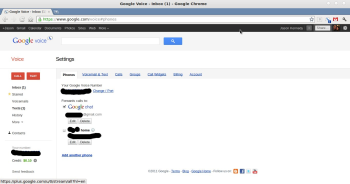
Next, click the gear at the top right of the Google Voice page and look at the options. You’ll want to add your landline's phone number (not your cell number!) by going to Settings, Phones and clicking Add a new phone. Google will call you to verify that the number is valid.

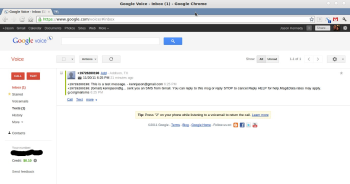
In the Google Voice settings, make sure to set 'Forwards calls' to Google Chat, as shown below. That way, a call you don’t answer (if you’re offline, for example) won’t ring through to your landline. Instead, you’ll receive an email transcription of your voicemail message, as well as a notification on your Android device that you have a new message.


You'll need to set Google Voice to forward calls to Google Chat.

Now that you've set up your Google Voice account, download Google Voice from the Android Market, if your phone doesn’t have the app already. The initial setup is easy: Log in, verify that you’re using the same forwarding number that you set up on the Web, and then check Use Google Voice for all calls (press the menu button on your phone and go into Settings in Google Voice, and then into Making Calls).

You can also set Google Voice to handle all your voicemail. It's a splendid service, but I'm not going to cover it here; read our basic Google Voice setup how-to article for specific instructions.

Having Google Voice running on your phone allows you to send text messages from the Google Voice number you created; it also lets you retrieve voicemail from the interface on your phone or on the website, from anywhere. Calls made to your Google Voice number will forward to your cell phone, and you get a host of settings and options for setting up groups (family, work, and the like) for ringtones, do not disturb, and other uses.

That’s all you need to do for Google Voice. Keep in mind that you may run into situations where your Internet connection is not good enough to make the call. In those cases, just turn off your Wi-Fi connection, and Google Voice will ask if you’d like to make the call over your cellular network instead.

Step 2: Set Up Groove IP
Google Voice is just one part of the puzzle--to ensure that calls to your Google Voice number forward to your smartphone over your Wi-Fi or mobile broadband connection, you need to set up Groove IP ($5) on your phone as well. (You can also download and install the free version of Groove IP Lite. It works just the same as the paid version) Normally, if someone calls your Google Voice number, that person will be forwarded directly to your voicemail, since Google has no switching mechanism to connect to your device (this procedure is called SIP, or Session Initialization Protocol). But Groove IP makes the connection for you. In addition, it can handle your incoming and outgoing calls in one place, as it has its own dialer and uses your Google Address Book to make calls.


Once you have Groove IP installed, you'll need to tweak the audio settings a bit.

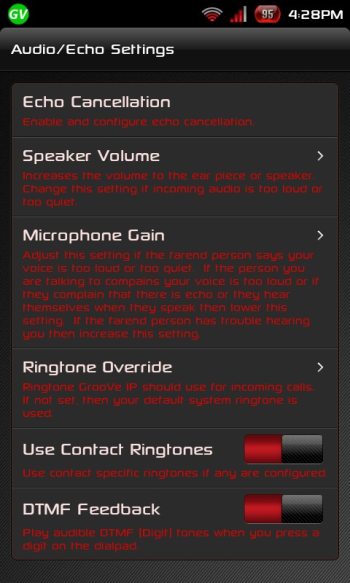
You’ll want to play around a bit with the settings, but if you go into Audio/Echo Settings, you’ll find several options that might need some tweaks.

  • Echo Cancellation: Bear in mind that this setting can introduce latency, or a delay between when you talk and when the other party hears you (and vice versa). Mess with this setting last, when you're in an if-all-else-fails scenario.
  • Speaker Volume: Though this may seem to be a general-use setting, try adjusting Speaker Volume if the party you are speaking with echos in your ear. A little goes a long way here, so make small changes and test them.
  • Microphone Gain: By default this setting is pretty decent for normal usage. If the party you are speaking with mentions that your voice is loud or has an echo, turn down the gain. Again, make only minor changes and test the results if you need to.

Changing the settings above will require you to disconnect and reconnect your call to test, so you might have to make multiple calls to play around until you tweak things just right. It helps to have a partner in crime willing to field multiple phone calls and report the changes. I also advise against doing the “Can you hear me now?” shtick.

Remember that you’ll need to have Groove IP running at all times to receive telephone calls to your Google Voice number, and that it will drain your battery to some extent. Plan accordingly.

Whether you decide to use Google Voice as an add-on to your existing voice service in a bad coverage area, or you elect to cut yourself free of carrier captivity and go it alone with Google Voice and Groove IP, good luck! Let us know how it works out in the comments.


Thursday, July 26, 2012

Dead Trigger Faces Rampant Piracy on Android

It's been said many times that Android developers find it hard to make money on Google's mobile platform, and this sad tale is further proof of that.


Developer Madfinger Games announced via Facebook on Monday that it's making its zombie first-person shooter Dead Trigger free on the Android platform, down from the lowly price of only 99 cents.


But it's not a new "freemium" model that drove Madfinger's decision: It's what they refer to as the "unbelievably high" piracy rate on Android.


"At first we intend to make this game available for as many people as possible -- that's why it was for as little as buck," the developer explained on Facebook. "However, even for one buck, the piracy rate is soooo giant, that we finally decided to provide DEAD TRIGGER for free.


"Anyway, DEAD TRIGGER is not FREEMIUM, it always was and still remains FREE-TO-PLAY, that means, all players are able to play it without IAP (in-app purchase)!" the statement concludes.


While recent hacks have compromised in-app purchases on iOS, such a move would still be almost laughable on Apple's mobile platforms, where the App Store enjoys a much higher level of security for all but a select few jailbreakers. But it's a sad statement on the Android platform, when users aren't willing to part with even a buck to indulge in a quality game.


Meanwhile, Madfinger still offers Dead Trigger for 99 cents on Apple's mobile platform, and apparently has no plans to change its pricing scheme there.